#crm
The Complete HubSpot Features Breakdown: A Guide to Every Module and How to Set Everythings Up
(Including Our Proven Method for End-to-End Automation with Asana, Monday.com, and Xero)
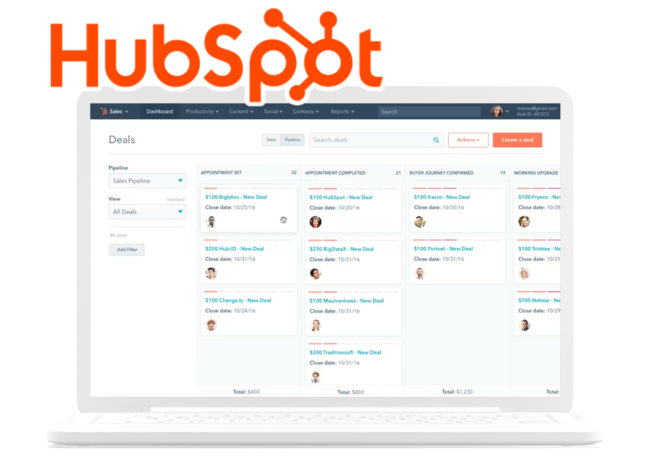
Ever wondered if there's a business platform that truly does it all? From that first website visit to becoming a loyal brand advocate, managing the entire customer journey is complex. That's where HubSpot steps in.
As a business who's been navigating this space for years, we've put together this comprehensive, module-by-module guide to HubSpot's features.
Think of it as your map to the entire ecosystem. Let's break it all down.
1. The Beating Heart: Core CRM HubSpot Features
Before the specialized Hubs, there's the central nervous system: the **Core CRM**. This is your single source of truth.
Unified Database
Stores **Contacts** (with custom properties and activity timelines), **Companies** (with relationship mapping), **Deals** (for your sales pipeline), and **Tickets** (for customer support).
Tasks & Activities
Keeps everything moving with integrated task management, email scheduling, and call logging.
HubSpot AI: The Game-Changer
- **Content Assistant:** Your AI writing partner for blogs and emails.
- **Predictive Scoring:** Automatically identifies hot leads and predicts churn.
- **Conversational AI:** Powers smart chatbots that can qualify leads and book meetings.
2. Marketing Hub: Your Audience Growth Engine
This is where you attract, engage, and delight your audience. It's far more than just email.
-
Email Marketing: A robust system with a drag-and-drop editor, A/B testing, and deep analytics.
-
Content Marketing: Built-in tools for **Blogs**, **Landing Pages**, and **Website Pages**, all with SEO recommendations.
-
Social Media Management: Schedule posts, monitor brand mentions, and track engagement across platforms.
-
Marketing Automation: Design complex **Workflows** for lead nurturing and set up **Account-Based Marketing (ABM)** campaigns.
3. Sales Hub: Close Deals Faster, Not Harder
Equip your sales team with tools that eliminate friction and provide insight.
-
Sales Productivity: **Email Integration** with tracking, **Meeting Scheduler** links, and built-in **Calling Tools** (VoIP).
-
Deal Management: Visual **Sales Pipelines**, **Quotes & Proposals** with e-signatures, and a **Document** library.
-
Sales Automation: Create multi-touch **Sequences** and standardize processes with **Playbooks**.
4. Service Hub: Turn Customers into Promoters
Exceptional service builds loyalty. This hub helps you scale that personal touch.
-
Customer Service Tools: A unified **Ticketing System**, a self-service **Knowledge Base**, and **Customer Feedback** collection (NPS, CSAT).
-
Service Automation: Use **Automation Rules** to auto-assign tickets and **Workflows** to automate reminders.
5. CMS Hub: Build Powerful, Optimized Websites
A content management system that’s built for marketers but loved by developers.
-
Content Management: Intuitive **Website Builder**, powerful **Blog Tools**, and **Landing Page** creator—all with drag-and-drop ease.
-
Performance & Security: Enterprise-grade **Hosting** on a global CDN with SSL, DDoS protection, and **Performance Optimization**.
6. Operations Hub: Connect and Clean Your Data
The glue that holds everything together. It ensures your data flows smoothly and stays accurate.
-
Data Sync & Integration: Connect with **1000+ apps** or build **Custom Integrations** using HubSpot’s powerful APIs.
-
Data Quality: Use **Data Cleaning** tools to deduplicate records and **Data Enrichment** to fill in missing details.
7. Commerce Hub
Power Your Transactions.
- **E-commerce Tools:** Manage **Product Catalog** and track **Orders** synced with the CRM.
- **Subscription Management:** Handle **Recurring Billing** and track key metrics like MRR/ARR.
8. Platform & Technical
Customize & Secure.
- **Customization:** Build **Custom Objects** (e.g., for projects) and **Custom Modules** for your website.
- **Security & Compliance:** Granular **User Management** and **GDPR** compliance tools.
9. Analytics & Reporting: The Insights Layer
Turn data into decisions with powerful, unified reporting.
-
Dashboards: Build **Custom Dashboards** with drag-and-drop ease or use **Standard Reports**.
-
Advanced Analytics: Go deep with **Attribution Reporting** and **Predictive Analytics**.
The Bottom Line: Scaling with Your Business
Core CRM, basic email, forms, and live chat.
Remove branding, add simple automation and ad management.
Advanced automation, A/B testing, custom reporting, and full SEO/social tools.
Unlimited automation, advanced security (SSO), custom objects, and predictive scoring.
The real magic isn't just in the individual tools, but in how they work together seamlessly, giving you a unified view of your customer and empowering every team to contribute to growth.
The Complete HubSpot Setup & Optimization Guide: Your Strategic Roadmap
A powerful tool is only as good as its setup. A rushed implementation leads to messy data and wasted potential. This guide is your tactical blueprint, from unboxing to optimization.
Phase 1: Strategic Preparation & Planning (Week 1)
Don't touch the settings yet. Success starts here, with a plan.
A. Initial Assessment
- **Audit Your Current Systems:** List every tool, evaluate data quality, and map your *actual* business processes.
- **Define Clear Business Objectives:** Set 3-5 primary, specific goals (e.g., "Increase qualified leads by 30% in Q4").
- **Resource Planning:** Form your core implementation team and set a realistic timeline (3-6 months).
B. Data Preparation (The "Garbage In, Garbage Out" Phase)
- **Data Cleansing:** Deduplicate relentlessly and enrich incomplete records *before* migration.
- **Data Mapping:** Plan how fields from your old system will map to HubSpot.
Phase 2: Technical Step-by-Step Setup
C. CRM Foundation (Weeks 2-3)
- **Contact Properties:** Start with essentials like Lead Source Detail and Customer Tier.
- **Deal Pipeline Configuration:** Customize stages to mirror your *actual* sales process (e.g., Qualified Lead → Discovery Call → Proposal).
D. Marketing Hub Setup (Weeks 3-4)
- **Website Integration:** Install the HubSpot tracking code on your site.
- **Email Sending Domains:** **Crucial:** Configure your SPF/DKIM records for maximum deliverability.
Phase 3: Department-by-Department Strategy
A. Marketing: Attract & Engage
- Map content to stages (Awareness, Consideration, Decision).
- Use HubSpot’s **Campaigns** tool to track ROI.
B. Sales: Close & Connect
- Define what a "Qualified Lead" means (use BANT).
- Establish a **Service Level Agreement (SLA)** with Marketing.
C. Service: Delight & Retain
- Set SLAs and configure routing rules for the **Ticket System**.
- Monitor **Customer Health Scores** proactively.
Phase 6: Measurement & Continuous Improvement
Dashboard Strategy
- **Executive Dashboard:** Focus on Revenue, CAC, LTV, Growth.
- **Departmental Dashboards:** Pipeline velocity (Sales), Lead gen metrics (Marketing), CSAT (Service).
The Non-Negotiable Success Factors
- **Executive Sponsorship:** Leadership must champion the tool.
- **Cross-Functional Team:** This is a business platform, not an IT project.
- **Data-Driven Mindset:** Let analytics, not hunches, guide your decisions.