#crm
The Ultimate 2026 HubSpot CRM Guide for Scaling Teams: How to Connect Marketing, Sales, and Operations
(Including Our Proven Method for End-to-End Automation with Asana, Monday.com, and Xero)
Introduction: Why HubSpot is Still the Go-To Platform in 2026
Let's be honest: the business software landscape is crowded. Yet, HubSpot has consistently grown from a simple CRM into what many now call a "Revenue Operating System." As we look toward 2026, its dominance isn't just about features—it's about solving real problems for agencies, SaaS companies, and consultancies that live and breathe process automation.
With a community of over 238,000 customers globally, HubSpot's strength lies in bringing everything together. Think about it: 91% of businesses with 10+ employees use a CRM. The differentiator? HubSpot removes the friction of juggling a dozen disconnected tools.
Here’s the core of its appeal:
- The All-in-One Playbook: Marketing, Sales, Service, CMS, and Operations—all on a single, unified database. No more exporting CSVs or losing data between apps.
- Automation for Everyone: Its visual workflow builder is a game-changer. You don't need an engineering degree to create sophisticated "if this, then that" sequences that save hours each week.
- An Ecosystem That Just Works: With its App Marketplace, HubSpot connects to nearly every tool in your stack (like Google Workspace, Slack, and Stripe) seamlessly.
But here's the catch we've learned firsthand: HubSpot is brilliant at the **revenue journey**, but it's not designed to be your project management hub or your accounting ledger. When a deal closes, the real work begins—kickoffs, deliverables, invoices. That's where smart integrations bridge the gap.
This guide is built from real implementation experience. We'll explore HubSpot's powerful 2025-2026 features, its practical limits, and exactly how to extend it into a true end-to-end engine using combinations like **HAX (HubSpot-Asana-Xero)** and **HMX (HubSpot-Monday-Xero)**.
What HubSpot CRM Really Is (Beyond the Sales Pitch)
Forget the textbook definition. In practice, HubSpot is the central nervous system of your customer lifecycle. It’s where a website visitor becomes a lead, then a contact, then a customer—with every email, call, and support ticket logged automatically.
Real-World Example: A SaaS founder sees a lead download an ebook. That contact is automatically enrolled in a nurture sequence. When they book a demo, the sales rep has their full history. After signing, their details flow into onboarding. This entire story lives in one place, with dashboards showing real-time health and forecast data.
Key Pieces of the Puzzle:
- Contacts & Companies: Intelligent records that update automatically. HubSpot's AI tools (like the Breeze Assistant) can now summarize accounts and prep sales calls.
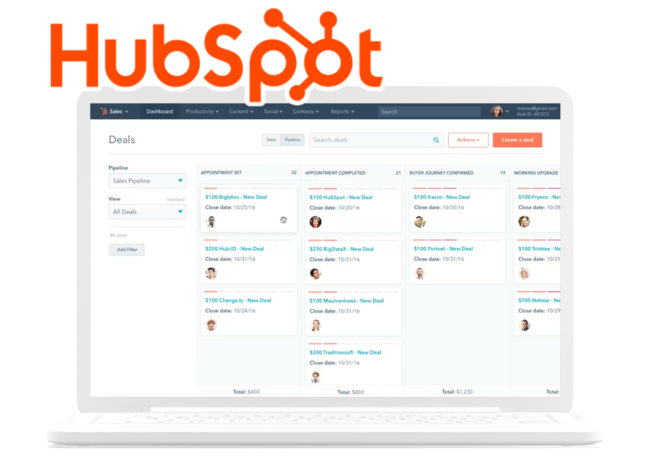
- Deals & Pipelines: Visualize your sales process. Modern features include AI-powered win probability and forecasting insights.
- Activities & Tasks: The glue that keeps teams aligned. Set reminders, log calls, and ensure follow-ups never slip.
Its freemium model (1,000 contacts, 2 users) makes it a no-brainer for startups, scaling elegantly to enterprise tiers. It’s no wonder that **87% of marketers using HubSpot report confidence in their strategy**, compared to just over half of those without an integrated CRM.
Why Agencies and SaaS Companies Choose HubSpot Over the Competition
The CRM market is vast (projected at ~$98B). So why HubSpot? It strikes a unique balance: powerful but not overwhelming, scalable but not sterile.
1. It’s Built for Speed and Clarity
New team members get it intuitively. Features like **multi-account portals** (2025 update) are a lifesaver for agencies managing multiple clients. The visual deal board helps SaaS teams instantly spot bottlenecks in their pipeline.
2. Marketing, Sales, and Service Are Actually Connected
This is HubSpot's superpower. From forms and landing pages to email sequences, ad management, and help desks—it’s all native. This unity eliminates data silos and gives a true 360° customer view, which is critical for subscription and service-based models.
3. Native Automation That Scales with You
The workflow engine is where efficiency is unlocked:
- Automatically assign leads based on round-robin rules.
- Move deals between stages with custom triggers.
- Send personalized emails after specific page visits.
The 2025 update introduced advanced multi-step branching, making these automations even more adaptive.
The Honest Truth: HubSpot's Limitations (And How to Solve Them)
We love HubSpot, but it’s not magic. Teams often hit these walls after implementation:
Limitation 1: It’s Not a Project Manager.
HubSpot tracks **that** a deal is won, but not **how** the work gets done.
Missing: Task dependencies, Gantt charts, sprint planning, resource workload views.
The Fix: Integrate with a dedicated tool like **Asana** (for template-driven projects) or **Monday.com** (for highly customizable workflows). Automatically create a project when a deal status changes to "Closed-Won."
Limitation 2: It’s Not an Accounting System.
While commerce hubs added basic invoicing, HubSpot isn't built for finance ops.
Missing: General ledger, chart of accounts, tax compliance, payment reconciliation.
The Fix: Connect to **Xero** or QuickBooks. Automatically generate invoices from deal data, sync payments, and keep financial records spotless.
Limitation 3: Workflow Gaps Between Systems.
Manual handoffs are productivity killers.
Classic Pain Points:
- A won deal doesn't trigger a project kickoff.
- A completed milestone doesn't generate an invoice.
- A paid invoice doesn't update the customer's success status in the CRM.
The Solution: A unified automation layer (like our HAX/HMX frameworks) that acts as the connective tissue between HubSpot, your PM tool, and your accounting software.
Real-World HubSpot Automation Blueprints (2026 Edition)
Let's translate theory into action. Here’s how modern teams orchestrate their processes.
Use Case 1: The Automated Client Onboarding (Agency/SaaS)
- Trigger: Deal stage changes to "Closed-Won" in HubSpot.
- Action 1: A dedicated client project is auto-created in Asana or Monday.com with a pre-built template (kickoff checklist, assigned tasks, due dates).
- Action 2: A draft invoice is generated in Xero with the correct line items and sent to the client.
Result: The sales-to-delivery handoff happens in minutes, not days. The account manager has full visibility.
Use Case 2: The Retainer & Milestone Manager (Consulting)
- Trigger: A project milestone is marked "Complete" in Monday.com.
- Action 1: Xero creates and sends a milestone invoice automatically.
- Action 2: Upon payment detection in Xero, the HubSpot contact record is tagged "Invoice Paid," triggering a customer health check workflow.
Result: Cash flow accelerates, and the account team is prompted for proactive check-ins.
Use Case 3: The Integrated Support-to-Upsell Flow
- Trigger: A high-priority ticket is closed in HubSpot Service Hub.
- Action 1: The resolution details are logged in a Monday.com board for QA.
- Action 2: After 7 days, an automated NPS survey is sent via HubSpot.
- Action 3: A high-score response triggers an upsell task for the sales team.
Result: Support becomes a revenue driver, not just a cost center.
Building on HubSpot's Data Model for True Automation
To automate intelligently, you need to understand the core objects:
- Contacts & Companies: The "who."
- Deals: The "opportunity."
- Tickets: The "support issue."
- Custom Objects (Premium): For anything unique to your business (e.g., Projects, Applications, Campaigns).
The magic happens when you map these to corresponding items in other systems:
- A **HubSpot Deal** becomes an **Asana Project** and a **Xero Invoice**.
- A **HubSpot Contact** becomes a **Xero Customer**.
- A **Monday.com Board Item** can update a **HubSpot Deal Stage**.
This connected data model is the foundation of a "single source of truth."
Conclusion & Your Next Step: HubSpot is the Engine, Integrations Are the Transmission
HubSpot is, without doubt, the leading CRM for growth-focused teams in 2026. Its vision as a cohesive platform is unmatched. However, its full potential is only unlocked when it's seamlessly connected to the best-of-breed tools you use for execution (like Asana or Monday) and finance (like Xero).
Trying to force HubSpot to do everything will lead to frustration. Instead, use it as the brilliant core of your operations and extend its reach.
Ready to build your connected system?
We specialize in creating these end-to-end automations. Whether your stack is **HubSpot + Asana + Xero (HAX)** or **Hubspot + Monday.com + Xero (HMX)**, we can help you design and implement a workflow that eliminates manual work, accelerates revenue, and provides flawless visibility.